rSEEK
A Snakemake-based pipeline for rsRNA quantification and biomarker discovery.
Importantly, rSEEK generates rsRNA quantification and annotation results that are consistent with those provided in the rsRNADisease database. Users can therefore directly reproduce rsRNADisease-style analyses on their own small RNA-seq data, enabling straightforward comparison with curated disease-associated rsRNA profiles.
Overview
rSEEK is an automated pipeline for quantification and annotation of rRNA-derived small RNAs (rsRNAs). It identifies and classifies rsRNAs by providing information on rsRNA length, abundance, parental rRNA subtype, and other features. It also supports optional analysis of other small non-coding RNAs (sncRNAs), including tsRNAs, ysRNAs, and miRNAs.
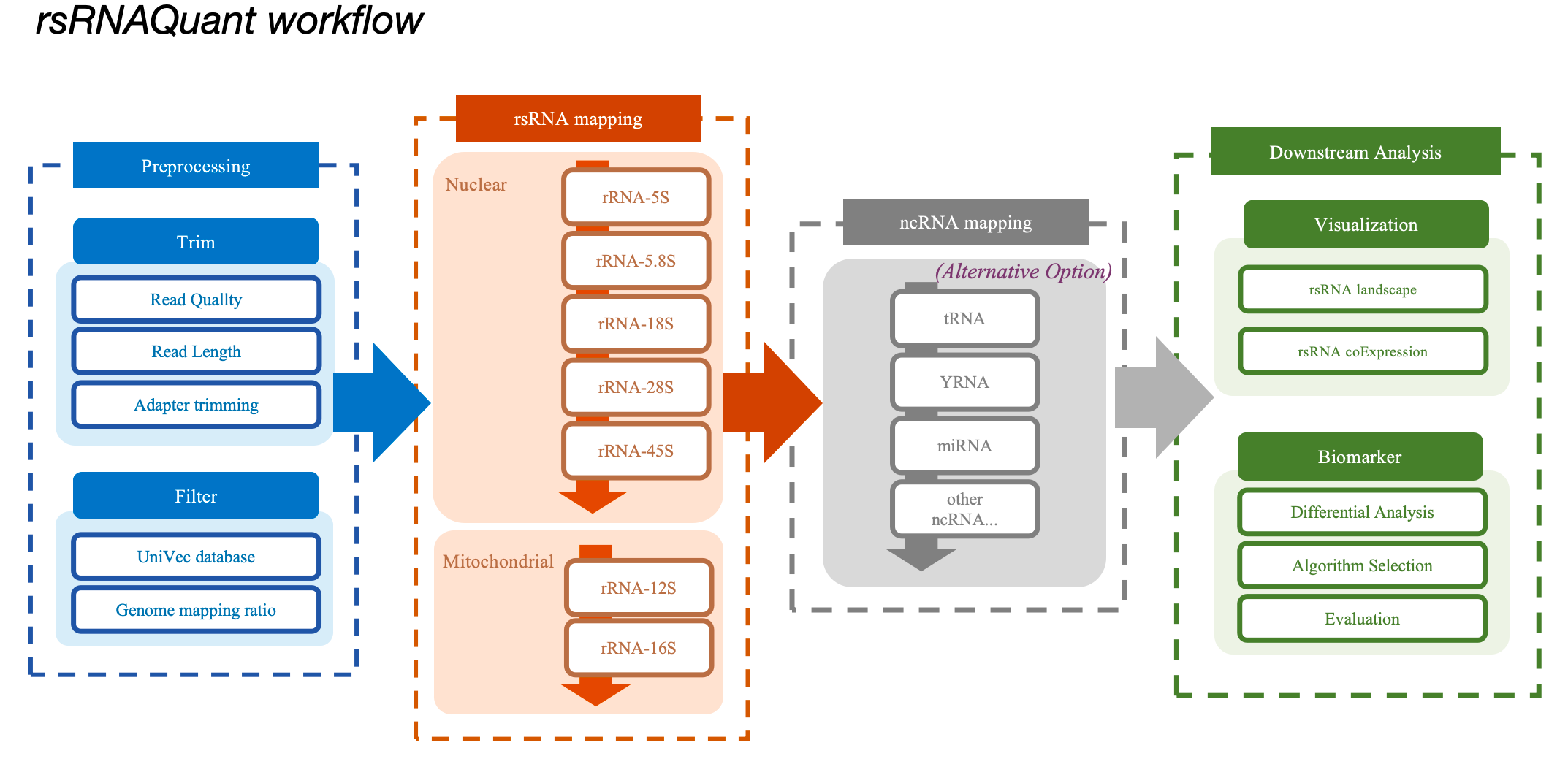
 GitHub Repository:
https://github.com/BIGRICEgo/rSEEK
GitHub Repository:
https://github.com/BIGRICEgo/rSEEK
Installation
rSEEK is developed using Python, R, Shell, and Snakemake, ensuring reproducibility and scalability across platforms.
It can be downloaded from the GitHub repository or directlyclick the link below:
Download and Prepare Data
                    # Navigate to the working directory
                    cd ./workspace
                    # Unzip the package
                    unzip rSEEK-main.zip

                    # Or directly git clone the repository
                    git clone https://github.com/BIGRICEgo/rSEEK.git
Download Annotations and Test Samples
1. To download annotation references, please use this link: https://yunpan.tongji.edu.cn/link/AAB740E00847784A9DA39F2EAF256F166B
To unpack references, please use the code below:
                        # Navigate to Annotation directory
                        cd rSEEK/annotation
                        # Depress the downloaded annotation package
                        tar -xJvf annotation.tar.xz
2. To download test sample data, please use this link: https://yunpan.tongji.edu.cn/link/AA71605A6F3DA24E24984C48C16704A00D
To unpack test samples, please use the code below:
                        # Create your own project data directory
                        mkdir data/your_project_name/
                        # Navigate to data directory
                        cd data/your_project_name/
                        # Depress the example data package
                        tar -xJvf test.tar.xz
Configuration
Modify the config/config.yaml file before running the workflow. Update the project name, sample names, and group assignments:
                    # config/config.yaml

                    # Directories
                    raw_data_dir: "data" # Path to raw data
                    results_dir: "results" # Path to output directory
                    scripts_dir: "scripts" # Path to script directory
                    annotation_dir: "annotation" # Path to annotation directory
                    ncRNA: false # Whether to perform analysis of ncRNAs, "true" or "false"
                    intermediate_files: false # Whether to all mapping details, "true" or "false"

                    # Project infos
                    project: "Test" # Project name
                    samples: # Sample names
                      - case1
                      - case2
                      - case3
                      - control1
                      - control2
                      - control3
                    groups: # Group to which samples belong.
                      case:
                        - case1
                        - case2
                        - case3
                      control:
                        - control1
                        - control2
                        - control3
Final Check
Ensure your folder matches the structure below.
                    rSEEK/
                    ├── assets/
                    ├── config/
                    │   ├── config.yaml
                    │   ├── environment.yml
                    ├── annotation/
                    │   ├── genome/
                    │   ├── rRNAdb/
                    │   ├── UniVec/
                    │   └── ...
                    ├── data/
                    │   ├── test/ # Or your project name
                    │   │   ├── case.fastq.gz
                    │   │   └── control.fastq.gz
                    ├── results/
                    │   ├── test/
                    │   │   ├── mapped/
                    │   │   ├── stats/
                    │   │   ├── plots/
                    │   │   └── test_report.html
                    ├── scripts/
                    │   ├── alignment_summary.sh
                    │   ├── count_unique_sequences.sh
                    │   ├── map_rRNA.sh
                    │   ├── map_ncRNA.sh
                    │   ├── re_logs.sh
                    │   ├── process_rna_seq.py
                    │   ├── CountMatrix.py
                    │   ├── ExprMatrix.py
                    │   ├── generate_report
                    │   ├── RPM.py
                    │   ├── compare_Plot_rRNA_coverage.R
                    │   ├── DA.R
                    │   ├── rRNA_length_distribution.R
                    │   └── template_report.html
                    └── Snakefile
Run rSEEK
Execute the following commands in the rSEEK/ directory:
Dry Run
snakemake -n --cores 4Full Execution
snakemake --cores 8Force rerun
snakemake --forceFinish uncompleted jobs
snakemake --rerun-incompleteAdvanced Usage
The Snakemake framework provides flexible rule definition and workflow control, allowing users to customize rules according to specific needs. For example:
1. Optional Alignment to Other ncRNA Types
Users can enable analysis of additional small non-coding RNAs with seven additional categories—"miRNA", "tRNA", "piRNA", "snoRNA", "snRNA", "YRNA", and "vaultRNA" by setting the ncRNA parameter to true in the config/config.yaml file (default: false, which restricts analysis to rsRNAs only).
2. Retention of Intermediate Files
To retain intermediate alignment files (stored in results/mapped/), set intermediate_files to true in config/config.yaml. Users should ensure sufficient disk space is available when enabling this option.
3. Optimized alignment
It permits adjustment of alignment parameters. rSEEK employs an optimized multi-mapping read assignment algorithm to achieve more precise sequence quantification.
Expected Outcomes
After successful execution, results will be saved under results/{Project}/. The folder structure is as follows:
| Folder | Description |
|---|---|
mapped/ |
Alignment results |
stats/ |
Expression matrices and statistics |
plots/ |
Visualization results |
Main outputs include text files, PNG/PDF visualizations, and an HTML report viewable in any browser.
*_alignment_summary_rRNA.txt: Hierarchical rRNA assignment details*_expression_matrix.txt: Normalized sncRNA expression table*_rRNA_length_distribution.txt: Length distribution per rRNA category*_DA_result.txt: Differential analysis results*_lasso_selected_features.txt: LASSO-selected features table- PDF/PNG visualizations: Distribution barplots, category pie charts, coverage lineplots, co-expression heatmaps, feature importance dotplots, ROC curves, etc.
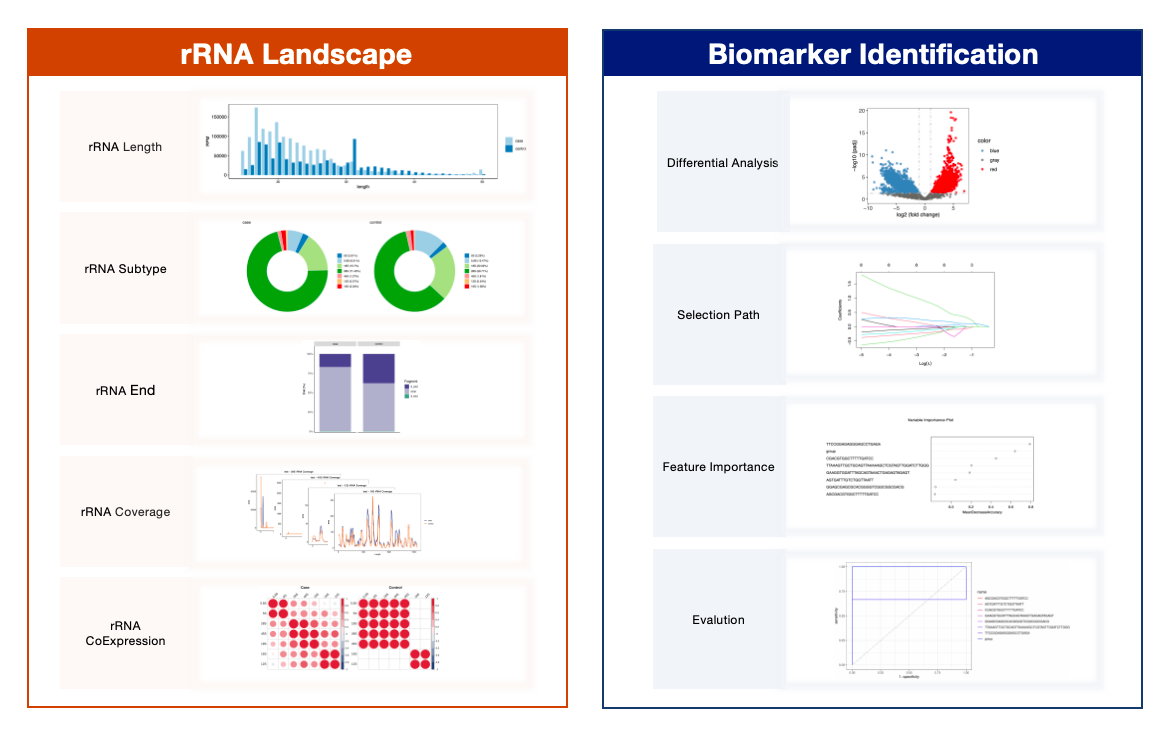
Online Report
The online report consists of four sections, each showcasing different aspects of the analysis. Below are example screenshots:
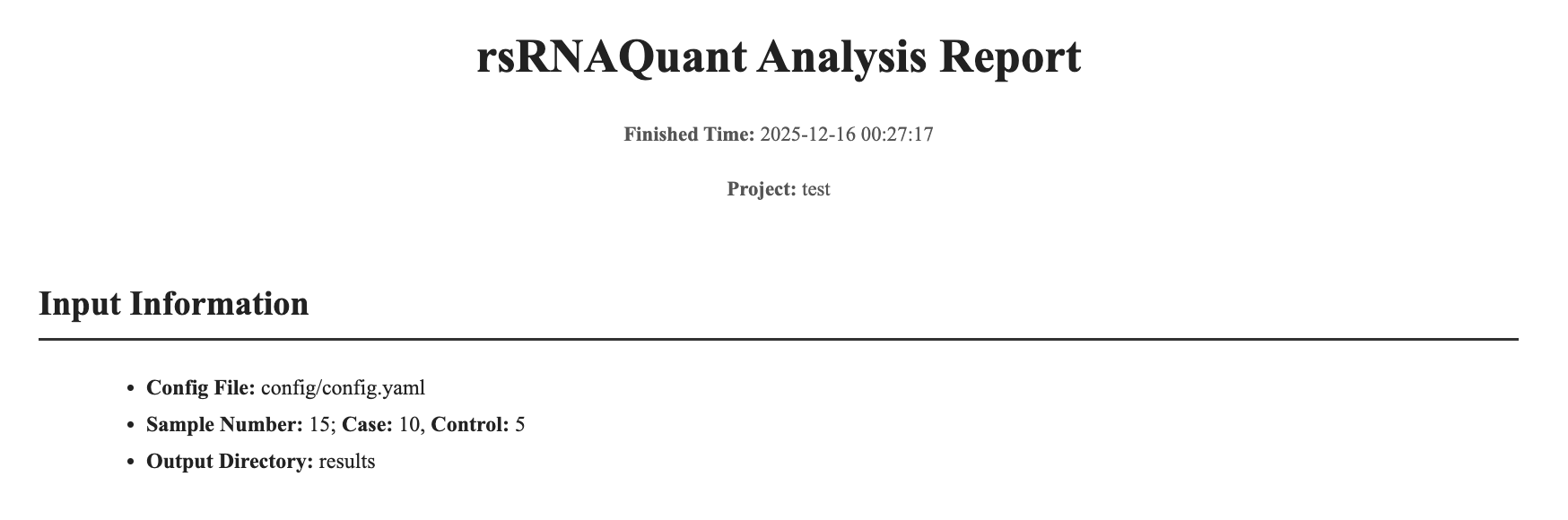
Part 1: Input Information
The Input Information section at the beginning of the rSEEK Analysis Report provides an overview of the analysis setup. It displays the report completion time and project name, and summarizes the key inputs used in the analysis, including the configuration file that defines all analysis parameters, the total number of samples processed with the numbers of case and control samples, and the output directory where all generated results, figures, and intermediate files are stored.
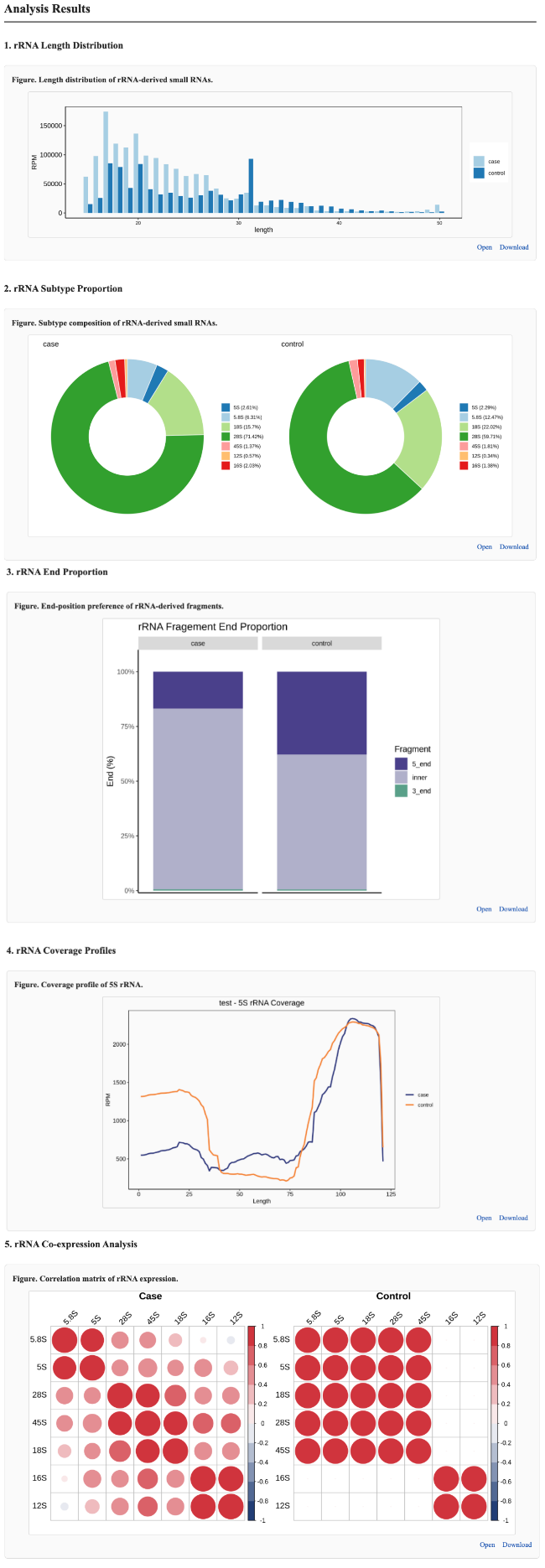
Part 2: rsRNA Profile
The rsRNA Profile section provides a comprehensive overview of the rsRNA expression landscape across all input samples. This part summarizes multiple aspects of rsRNA characteristics, including length distribution, subtype composition, end-position preference, genomic coverage profiles, and co-expression patterns. For each type of analysis, results are presented in a way that allows direct comparison between case and control groups, enabling users to visually assess group-specific differences in rsRNA features and expression patterns.
⚠️ Notes: Co-expression analysis is performed only when both the case and control groups contain >4 samples; otherwise, the analysis and corresponding figures are omitted from the report.
Part 3: Biomarker Analysis
The Biomarker Analysis section summarizes the results of rsRNA biomarker screening and identification by integrating differential expression analysis, machine learning–based feature selection, and model evaluation. Differential analysis reports the numbers of up- and down-regulated rsRNAs between case and control groups and visualizes the results using a volcano plot. Machine learning analysis applies LASSO regression to select informative rsRNA features and provides an interactive table displaying their expression levels and detailed rsRNA profile information. Model evaluation assesses classification performance using Random Forest–based feature importance and ROC curve analysis.
⚠️ Notes: Biomarker Analysis is performed only when both the case and control groups contain >3 samples.
The presence of differential expression results does not necessarily guarantee biomarker identification, as LASSO regression may not select suitable rsRNA features under certain conditions.
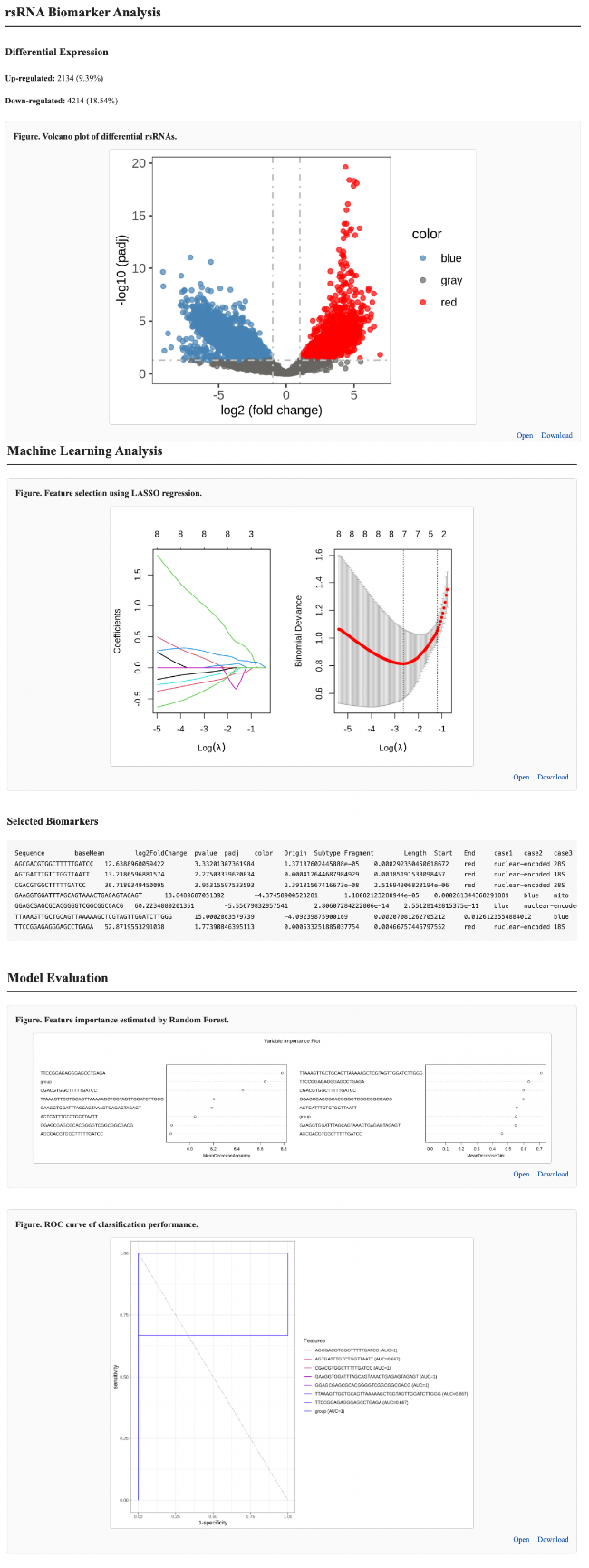
Part 4: Report Summary
The Downloadable Files section provides access to result files generated from the rsRNA profiling and biomarker analysis. These files include alignment summaries, rsRNA expression and count matrices, as well as the outputs of differential analysis and LASSO-based feature selection, allowing users to perform downstream analysis or reuse the results in other workflows.
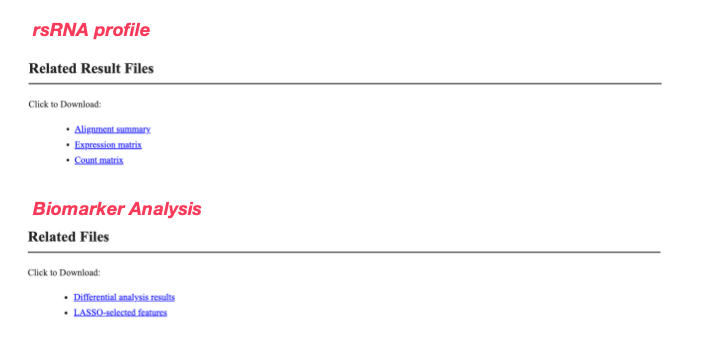
Example Report Download
To view a full-size report example, please click the download button below:
Parameters Used
The main parameters used in rSEEK are listed below:
                # Trim Galore
                    trim_galore --quality 30 --length 15 --max_length 50 -j 8

                # Filter
                    bowtie -p 4 --un {output.filtered} # Keep unmmaped content

                # Alignment parameters - genome
                    bowtie -v 1 -p 10 -k 1

                # Alignment parameters - rRNA
                    bowtie -v 1 -a -p 8 --fullref --norc

                # Alignment parameters - other sncRNA (optional)
                    bowtie -v 1 -k 3 -p 8 --fullref --norc --best --strata
References
Tools used in rSEEK
| Tool Name | Version | Description |
|---|---|---|
| Trim Galore | 0.6.10 | Adapter trimming for FASTQ files |
| Bowtie | 1.3.1 | Short-read alignment |
| Samtools | 1.21 | Manipulate alignments in the SAM format |
| Snakemake | 7.8.0 | Workflow management system |
| R | 4.2.2 | Statistical computing and graphics |
| Python | 3.9.7 | General-purpose programming language |
References used in rSEEK
| Reference | Source | 🔗 Link |
|---|---|---|
| UniVec | NCBI UniVec | https://www.ncbi.nlm.nih.gov/tools/vecscreen/univec/ |
| genome | UCSC hg38 | http://hgdownload.soe.ucsc.edu/ |
| rRNA | NCBI GenBank | https://www.ncbi.nlm.nih.gov/nuccore |
| YRNA | NCBI GenBank | https://www.ncbi.nlm.nih.gov/nuccore |
| tRNA | GtRNAdb, mitotRNAdb | http://gtrnadb.ucsc.edu/; http://mttrna.bioinf.uni-leipzig.de/mtDataOutput/ |
| miRNA | miRBase V22 | http://www.mirbase.org/ |
| piRNA | piRBase v3.0 | http://bigdata.ibp.ac.cn/piRBase/ |
| snoRNA | snoDB v2.0.0 | https://bioinfo-scottgroup.med.usherbrooke.ca/snoDB/ |
| snRNA | RNAcentral | https://rnacentral.org/ |
| vaultRNA | RNAcentral | https://rnacentral.org/ |